Shows a map of the current level you are playing. Use the movement keys (WASD by default) to view different areas on the map. To access the local map, press the map key (tab by default). At the bottom of the screen your will be able to switch between the different screens. You can quickly access specific screens using the F-keys. F1: Local, F2: World, F3: Inventory and F4: Log.
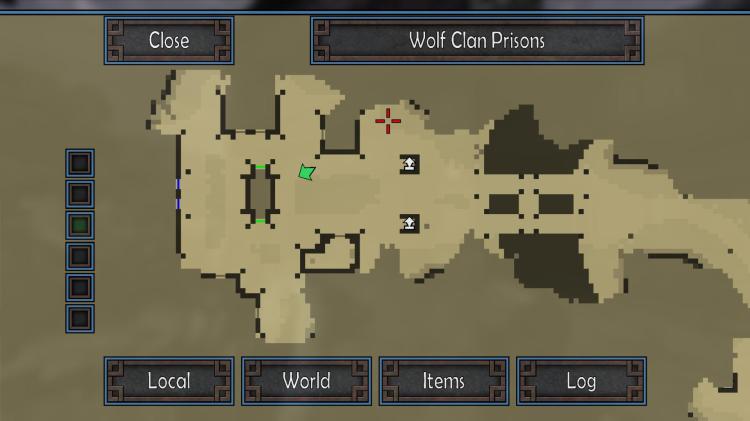
Scouting: Areas you have not scouted yet are darker tan (this color can be changed in setup). To scout them move to those areas.
Layers: Each level will have multiple layers. To see a different layer than the one you are currently on just click on one of the layer buttons on the left side of the screen.
Doors: Thin horizontal and vertical line represent doors. The color of the door will tell you how the door functions. Tan doors are general and usable all the time. Doors the same color as the walls are unusable. Colored doors require that color key to be opened.
Elevators: White horizontal block with an arrow represent elevator shafts. The arrow direction shows which way the elevator will take you. While near an elevator or shaft your cursor will change to a box. Press the use key (space by default) to activate the elevator.
Jump Pads: Purple arrows pointing up represent jump pads. Move over a jump pad to be tossed into the air.
Teleporters: Green spiky objects represent teleporters. Move over a teleporter to activate it and be teleported to a different location.
World Exits: Blue arrows represent world exits. World exits allow you to travel to different areas of the world. The direction of the arrow tells you which direction in the world the exit will take you.
Items: Special items such as keys will be represented by large outlined colored squares. The color of the square determines the type of the item.
Enemies: Larger red squares represent living enemies.
Civilians: Larger blue squares represent civilians.
 Atomic Hick Software